

25 Best AI Tools for Content Creation (2026): Free & Paid Tools Compared
If you create content for a living — or even just on the side — you’ve probably noticed something over the last couple of years: the tools have gotten scary good. What used to take a full day (drafting a blog post, cutting a video, designing a thumbnail, writing ad copy) can now take an hour, sometimes less.
That’s not hype. It’s the actual shift happening across marketing teams, solo creators, agencies, and small businesses right now. AI hasn’t replaced the creative process, but it has removed most of the friction around it. Writers use AI to get past the blank page. Designers use it to generate ten concepts before lunch instead of one. Video editors use it to transcribe, caption, and trim footage automatically. And marketers use it to research keywords, outline articles, and repurpose one piece of content into a dozen formats.
The catch is that there are now hundreds of AI content tools competing for your attention, and most “best of” lists online are either outdated, padded with affiliate picks, or written by someone who’s clearly never opened the tool. This guide is different. We’ve tested and researched 25 of the most genuinely useful AI tools for content creation in 2026, covering writing, images, video, audio, SEO, and productivity — with honest pros, cons, and pricing for each.
By the end, you’ll know exactly which tools fit your budget, your skill level, and the type of content you actually make, rather than just chasing whatever’s trending on social media this month.
What Are AI Content Creation Tools?
AI content creation tools are software platforms that use machine learning — usually large language models or diffusion models — to help you produce, edit, or optimize content faster than doing it manually. Instead of replacing your skills, most of these tools act as a collaborator that handles the repetitive or technical parts of content production. Broadly, they fall into six categories:
• Text tools – draft blog posts, emails, ad copy, and scripts (ChatGPT, Jasper, Copy.ai)
• Image tools – generate original artwork, product photos, and graphics (Midjourney, Adobe Firefly, Leonardo AI)
• Video tools – create, edit, or translate video content (Runway, Pictory, Descript)
• Audio tools – generate voiceovers, clone voices, and clean up sound (ElevenLabs, Descript)
• SEO tools – research keywords and optimize content for search (Surfer SEO, Frase, Scalenut)
• Social & productivity tools – design posts, manage workflows, and summarize research (Canva AI, Notion AI, Gamma)
Most creators end up using a small stack of three or four tools rather than one all-in-one platform, because no single tool does everything equally well.
Quick Comparison Table
| Tool | Best For | Free Plan | Starting Price |
| ChatGPT | General writing & research | Yes | $20/month |
| Claude | Long-form writing & analysis | Yes | $20/month |
| Gemini | Google Workspace integration | Yes | $19.99/month |
| Canva AI | Social graphics & design | Yes | $12.99/month |
| Jasper | Brand-voice marketing copy | No (trial) | $49/month |
| Copy.ai | Sales & marketing copy | Yes | $49/month |
| Writesonic | SEO articles at scale | Yes | $39/month |
| Grammarly | Editing & proofreading | Yes | $12/month |
| Notion AI | Notes & workspace writing | Add-on | $10/month |
| Midjourney | Artistic AI images | No | $10/month |
| Adobe Firefly | Commercial-safe images | Yes | $9.99/month |
| Leonardo AI | Game & concept art | Yes | $12/month |
| Runway | AI video generation | Yes | $15/month |
| Pictory | Turning text into video | Yes (trial) | $19/month |
| Descript | Video/audio editing by text | Yes | $24/month |
| ElevenLabs | AI voiceovers | Yes | $5/month |
| Perplexity | AI-powered research | Yes | $20/month |
| Gamma | AI presentations | Yes | $10/month |
| Synthesia | AI avatar videos | No (demo) | $18/month |
| HeyGen | AI avatar & translation videos | Yes (trial) | $24/month |
| Surfer SEO | Content optimization | No | $89/month |
| Frase | SEO briefs & outlines | Yes (trial) | $15/month |
| Scalenut | SEO content workflows | Yes (trial) | $23/month |
| CapCut AI | Short-form video editing | Yes | $9.99/month |
| VEED AI | Browser-based video editing | Yes | $12/month |
Pricing reflects standard monthly plans at the time of writing. AI tool pricing changes often, so double-check the official site before subscribing.
25 Best AI Tools for Content Creation
ChatGPT
Overview: ChatGPT, built by OpenAI, is the tool that put conversational AI on the map, and it’s still the most versatile writing assistant available. It handles everything from blog drafts to brainstorming to code snippets, and newer versions have gotten noticeably better at following detailed instructions and holding context across long conversations.
Best for: General-purpose writing, research, brainstorming, and light coding help.
Features: Custom GPTs for repeatable workflows, file uploads and analysis, image generation, voice mode, web browsing, and memory across chats.
Pros: Extremely flexible, huge plugin/GPT ecosystem, strong at following nuanced instructions.
Cons: Can produce generic-sounding copy without careful prompting; free tier has usage limits.
Pricing: Free plan available; Plus plan around $20/month with higher limits and advanced features.
Official website: chatgpt.com
Verdict: The best starting point for almost any content creator, especially if you only want to pay for one AI subscription.
Claude
Overview: Claude, made by Anthropic, has earned a reputation among writers and analysts for producing thoughtful, well-structured long-form content with a more natural, less “AI-sounding” tone than many competitors. It’s particularly strong at handling large documents and nuanced editing tasks.
Best for: Long-form articles, reports, document analysis, and editing.
Features: Large context window for handling long documents, Artifacts for building and previewing content, strong reasoning on complex prompts, file and image analysis.
Pros: Natural writing tone, excellent at following detailed style guides, handles large documents well.
Cons: Smaller plugin ecosystem than ChatGPT; image generation is more limited.
Pricing: Free plan available; Pro plan around $20/month.
Official website: claude.ai
Verdict: A strong pick for writers and editors who care about tone and want fewer robotic-sounding drafts.
Best AI Tools for YouTube Creators in 2026
Gemini
Overview: Google’s Gemini is built directly into Docs, Gmail, and Sheets, which makes it a natural fit for teams already living inside Google Workspace. It’s also tightly integrated with Google Search, giving it an edge for up-to-date information.
Best for: Teams already using Google Workspace who want AI embedded in their existing tools.
Features: In-app assistance across Gmail, Docs, and Sheets, real-time Google Search grounding, multimodal input (text, image, voice).
Pros: Seamless Workspace integration, good at pulling current information, generous free tier.
Cons: Writing quality can feel less polished than ChatGPT or Claude for long-form content.
Pricing: Free plan available; Google AI Pro around $19.99/month.
Official website: gemini.google.com
Verdict: Worth it primarily if your workflow already runs through Google Workspace.
Canva AI
Overview: Canva has quietly become one of the most useful AI content tools for creators who need visuals fast but aren’t designers. Its Magic Studio suite bundles AI image generation, background removal, resizing, and copywriting into the same drag-and-drop editor millions of marketers already know.
Best for: Social media graphics, presentations, and quick marketing visuals.
Features: Magic Design, Magic Write, background remover, AI image generation, brand kits, thousands of templates.
Pros: Beginner-friendly, huge template library, one tool covers design and light copywriting.
Cons: AI image quality trails dedicated tools like Midjourney; advanced features locked behind Pro plan.
Pricing: Free plan available; Canva Pro around $12.99/month.
Official website: canva.com
Verdict: The easiest way for non-designers to produce professional-looking visuals daily.
Jasper
Overview: Jasper positions itself as an enterprise-grade AI writing platform built specifically for marketing teams. Its biggest strength is brand voice consistency — you can train it on your existing content so every output sounds like your brand, not a generic AI.
Best for: Marketing teams producing on-brand copy at scale.
Features: Brand voice training, campaign workflows, SEO mode, team collaboration, integrations with Surfer SEO and Google Docs.
Pros: Strong brand consistency tools, built for teams, good campaign templates.
Cons: Expensive for solo creators; no permanent free plan.
Pricing: Plans start around $49/month per seat, billed annually.
Official website: jasper.ai
Verdict: Best suited to agencies and marketing teams, less so for individual bloggers on a budget.
Copy.ai
Overview: Copy.ai started as a short-form copywriting tool and has since expanded into full workflow automation for sales and marketing teams, letting you chain AI steps together to go from research to finished copy without switching tools.
Best for: Sales enablement, ad copy, and marketing workflow automation.
Features: Workflow builder, CRM integrations, 90+ copywriting templates, chat interface for brainstorming.
Pros: Good free tier, useful automation features, easy to learn.
Cons: Long-form content quality lags behind Jasper or Claude.
Pricing: Free plan available; paid plans start around $49/month.
Official website: copy.ai
Verdict: A solid pick for short-form marketing copy and light workflow automation.
Writesonic
Overview: Writesonic leans heavily into SEO-focused content generation, with built-in tools for producing optimized articles, product descriptions, and landing pages at a lower price point than most competitors.
Best for: Producing SEO articles and product copy at scale.
Features: Article writer with SEO scoring, AI article rewriter, bulk content generation, Chatsonic chat assistant.
Pros: Affordable for the feature set, good for scaling blog content, built-in SEO checks.
Cons: Output often needs a heavier editing pass than premium tools.
Pricing: Free trial; paid plans start around $39/month.
Official website: writesonic.com
Verdict: A budget-friendly option for content teams that publish blog articles regularly.
Grammarly
Overview: Grammarly has evolved from a simple grammar checker into a full AI writing assistant, catching everything from typos to tone mismatches while offering AI-generated rewrites directly inside your browser, email, or documents.
Best for: Proofreading, tone adjustment, and polishing drafts written elsewhere.
Features: Grammar and clarity checks, tone detector, AI rewrite suggestions, plagiarism checker (paid tiers), browser extension.
Pros: Works everywhere you type, catches subtle errors other tools miss, excellent free tier.
Cons: Not a content generator on its own; best used alongside a writing tool.
Pricing: Free plan available; Premium around $12/month.
Official website: grammarly.com
Verdict: A near-essential companion tool regardless of which AI writer you use to draft content.
Notion AI
Overview: Notion AI is built directly into the Notion workspace, so if your team already stores notes, docs, and project plans there, it adds AI drafting, summarizing, and Q&A without needing to open another app.
Best for: Teams that already use Notion for docs and project management.
Features: AI writing and editing inside pages, Q&A across your workspace, meeting notes summarization, translation.
Pros: No context-switching for Notion users, good at summarizing internal knowledge.
Cons: Only useful if you’re already committed to the Notion ecosystem.
Pricing: Add-on to existing Notion plans, roughly $10/member/month.
Official website: notion.so
Verdict: Great value if you’re already a Notion user; not worth adopting Notion just for the AI.
Midjourney
Overview: Midjourney remains the gold standard for artistic, visually striking AI-generated images. It’s the tool most professional illustrators and concept artists reach for when the goal is a distinctive, high-quality image rather than a quick stock-photo replacement.
Best for: Artistic, stylized images and concept art.
Features: Highly detailed image generation, style consistency tools, upscaling, web-based interface (no Discord required anymore).
Pros: Best-in-class image quality and artistic range, strong community and style references.
Cons: No free plan, steeper learning curve for prompting, commercial licensing requires a paid plan.
Pricing: Plans start around $10/month.
Official website: midjourney.com
Verdict: The top choice when image quality and artistic style matter more than speed or simplicity.
Adobe Firefly
Overview: Firefly is Adobe’s AI image and design generator, built with commercial use in mind. Because it’s trained on licensed content, it’s a safer legal choice for brands that need to avoid copyright disputes, and it integrates directly into Photoshop and Illustrator.
Best for: Commercially safe images for brands and agencies.
Features: Text-to-image generation, generative fill inside Photoshop, text effects, vector recoloring in Illustrator.
Pros: Commercial-use licensing built in, tight Adobe Creative Cloud integration, consistent quality.
Cons: Less artistically expressive than Midjourney; best features require a Creative Cloud subscription.
Pricing: Free plan available; paid plans start around $9.99/month.
Official website: firefly.adobe.com
Verdict: The safer legal choice for businesses that need AI images without copyright risk.
Leonardo AI
Overview: Leonardo AI is popular among game developers and designers who need consistent character art, textures, and concept designs. It gives more fine-tuned control over image generation than most competitors, including training custom models on your own style.
Best for: Game assets, concept art, and consistent character design.
Features: Custom model training, image-to-image transformation, real-time canvas editing, motion (image-to-video).
Pros: Strong control over style and consistency, generous free credits, active creator community.
Cons: Interface can feel overwhelming for first-time users.
Pricing: Free plan available; paid plans start around $12/month.
Official website: leonardo.ai
Verdict: A favorite among game designers and artists who need more creative control than Midjourney offers.
Runway
Overview: Runway is one of the most advanced AI video generation platforms available, letting creators generate short video clips from text or images, extend existing footage, and apply cinematic effects that used to require a full VFX team.
Best for: AI-generated video clips and creative video effects.
Features: Text-to-video and image-to-video generation, green screen removal, motion tracking, video inpainting.
Pros: Genuinely impressive video generation quality, useful for creative and experimental content.
Cons: Generation credits get used up quickly; still limited in clip length.
Pricing: Free plan available; paid plans start around $15/month.
Official website: runwayml.com
Verdict: Best for creators experimenting with AI-generated video rather than standard editing tasks.
Pictory
Overview: Pictory is built around one specific job: turning long-form text or existing footage into short, shareable videos automatically, which makes it especially popular with bloggers repurposing articles into video content.
Best for: Turning blog posts and scripts into video content.
Features: Text-to-video conversion, automatic highlight extraction from long videos, auto-captioning, stock footage library.
Pros: Fast way to repurpose written content, good for social clips, no editing experience needed.
Cons: Less creative control than a full video editor; voice options can sound robotic.
Pricing: Free trial; paid plans start around $19/month.
Official website: pictory.ai
Verdict: A practical repurposing tool for bloggers and marketers who don’t want to learn video editing.
Descript
Overview: Descript changed how a lot of podcasters and video editors work by letting you edit audio and video by editing a text transcript — delete a word from the transcript, and it removes it from the recording too.
Best for: Podcast and video editing by editing text.
Features: Transcript-based editing, AI voice cloning (Overdub), filler word removal, screen recording, multitrack editing.
Pros: Dramatically faster editing workflow, beginner-friendly, useful for podcasts and talking-head videos.
Cons: Less suited to heavily stylized or cinematic edits.
Pricing: Free plan available; paid plans start around $24/month.
Official website: descript.com
Verdict: One of the best time-saving tools for anyone regularly editing spoken-word audio or video.
ElevenLabs
Overview: ElevenLabs is widely considered the leader in AI voice generation, producing voiceovers that are difficult to distinguish from real human narration. It supports dozens of languages and lets you clone your own voice for consistent branding.
Best for: AI voiceovers, audiobooks, and multilingual narration.
Features: Realistic text-to-speech, voice cloning, dubbing across 30+ languages, API access for developers.
Pros: Extremely natural-sounding voices, strong multilingual support, affordable entry tier.
Cons: Voice cloning raises ethical and consent considerations that require responsible use.
Pricing: Free plan available; paid plans start around $5/month.
Official website: elevenlabs.io
Verdict: The top choice for creators who need professional-quality voiceovers without hiring a narrator.
Perplexity
Overview: Perplexity functions as an AI research assistant that answers questions with cited, up-to-date sources rather than just generating text from memory, making it genuinely useful for fact-checking and research-heavy content.
Best for: Research, fact-checking, and source-backed answers.
Features: Real-time web search with citations, focus modes for academic or specific sources, follow-up threads.
Pros: Reduces the risk of AI-generated misinformation, saves research time, clean interface.
Cons: Not designed for long-form drafting; better paired with a writing tool.
Pricing: Free plan available; Pro plan around $20/month.
Official website: perplexity.ai
Verdict: An excellent research companion to use before or alongside your writing tool of choice.
Gamma
Overview: Gamma turns a rough outline or prompt into a fully designed presentation, document, or webpage in minutes, cutting out the hours normally spent formatting slides.
Best for: Fast, well-designed presentations and pitch decks.
Features: AI-generated slide decks, one-click restyling, embedded media, webpage and document formats.
Pros: Saves significant design time, clean modern templates, easy to edit after generation.
Cons: Less flexibility than PowerPoint or Keynote for highly custom layouts.
Pricing: Free plan available; paid plans start around $10/month.
Official website: gamma.app
Verdict: A time-saver for anyone who regularly builds decks or pitch documents.
Synthesia
Overview: Synthesia lets you create videos featuring realistic AI avatars reading a script, without needing a camera, studio, or on-camera talent, which has made it popular for corporate training and localized marketing videos.
Best for: Training videos, explainer videos, and localized marketing content.
Features: 140+ AI avatars, 130+ language voiceovers, custom avatar creation, screen recording integration.
Pros: No filming required, fast localization into multiple languages, professional avatar quality.
Cons: Avatars can still feel slightly synthetic for emotionally nuanced content; no permanent free plan.
Pricing: Free demo available; paid plans start around $18/month.
Official website: synthesia.io
Verdict: Ideal for corporate and training content where consistency matters more than emotional range.
HeyGen
Overview: HeyGen competes directly with Synthesia in the AI avatar space but has become particularly known for its video translation feature, which can dub a video into another language while matching the speaker’s lip movements.
Best for: AI avatar videos and cross-language video translation.
Features: AI avatar generation, video translation with lip-sync, voice cloning, template library.
Pros: Impressive translation and lip-sync accuracy, fast turnaround, growing avatar library.
Cons: Higher-tier features get expensive quickly for frequent use.
Pricing: Free trial; paid plans start around $24/month.
Official website: heygen.com
Verdict: Best pick for creators or businesses producing video content for global, multilingual audiences.
Surfer SEO
Overview: Surfer SEO analyzes top-ranking pages for any keyword and gives you a data-backed content structure — word count, headings, and terms to include — making it a favorite among SEO-focused content teams.
Best for: Optimizing articles to rank on search engines.
Features: Content editor with live SEO scoring, SERP analyzer, keyword research, audit tool for existing content.
Pros: Data-driven approach removes guesswork, integrates with Jasper and Google Docs, strong for competitive keywords.
Cons: Premium pricing; can encourage over-optimization if followed too rigidly.
Pricing: Paid plans start around $89/month.
Official website: surferseo.com
Verdict: Worth the investment for content teams serious about ranking in competitive niches.
Frase
Overview: Frase focuses on the research and outlining stage of SEO content, pulling data from top-ranking pages to generate content briefs and answering “People Also Ask” style questions automatically.
Best for: Building SEO content briefs and outlines quickly.
Features: Automated content briefs, SERP-based outlines, AI writing assistant, Google Search Console integration.
Pros: Speeds up the research phase significantly, affordable entry point, useful for content teams managing writers.
Cons: Writing quality is secondary to its research features.
Pricing: Free trial; paid plans start around $15/month.
Official website: frase.io
Verdict: A smart pick for content managers who brief out writing to a team rather than writing solo.
Scalenut
Overview: Scalenut combines keyword research, content briefs, AI writing, and on-page optimization into one workflow, aiming to cover the entire SEO content pipeline in a single subscription.
Best for: End-to-end SEO content workflows for small teams.
Features: Cruise Mode for full-article generation, keyword planner, content optimizer, topic clusters.
Pros: Covers research through publishing in one tool, good value for the feature set.
Cons: AI-generated drafts still need human editing for tone and accuracy.
Pricing: Free trial; paid plans start around $23/month.
Official website: scalenut.com
Verdict: A solid all-in-one option for small teams that want fewer tools to manage.
CapCut AI
Overview: CapCut has become the default editing app for short-form video creators on TikTok and Instagram Reels, and its AI features — auto-captioning, background removal, and smart cutting — make fast-paced editing accessible to beginners.
Best for: Short-form video editing for TikTok, Reels, and Shorts.
Features: Auto-captions, AI background removal, text-to-speech, template-based editing, mobile and desktop apps.
Pros: Free tier is genuinely powerful, huge trend-based template library, beginner-friendly.
Cons: Less suited to long-form or professional video production.
Pricing: Free plan available; Pro plan around $9.99/month.
Official website: capcut.com
Verdict: The go-to choice for creators focused on short-form, trend-driven video content.
VEED AI
Overview: VEED is a browser-based video editor with AI features built for marketers and creators who want a faster, no-install alternative to desktop editing software, without sacrificing professional polish.
Best for: Browser-based video editing without installing software.
Features: Auto-subtitles in 100+ languages, AI avatars, background noise removal, brand kit for consistent styling.
Pros: No downloads required, clean interface, good collaboration features for teams.
Cons: Can feel slower than desktop editors for longer, complex projects.
Pricing: Free plan available; paid plans start around $12/month.
Official website: veed.io
Verdict: A convenient option for marketing teams that need quick, professional edits without a steep learning curve.
How to Choose the Right AI Tool
With 25 solid options on the table, picking the right one comes down to five practical questions rather than which tool has the flashiest marketing.
Budget. If you’re just starting out, lean on free plans first (ChatGPT, Claude, Canva, and Grammarly all have genuinely usable free tiers) before committing to a paid subscription. Most creators build a stack gradually rather than buying five tools on day one.
Features you actually need. Don’t pay for an all-in-one platform if you only need one function. A solo blogger doesn’t need Jasper’s full campaign suite; a free ChatGPT plan and a good SEO brief tool will get most of the job done.
Ease of use. Some tools (Canva, CapCut) are built for beginners with zero learning curve. Others (Midjourney, Surfer SEO) reward the time you invest in learning how to prompt or configure them properly. Be honest about how much time you want to spend learning a new interface.
Team size. Solo creators generally do better with flexible, pay-as-you-grow tools. Teams benefit more from platforms with collaboration features, shared brand voices, and admin controls — which is where tools like Jasper, Notion AI, and Scalenut start to pull ahead.
Content type. Match the tool to the medium. A YouTuber’s stack (Descript, ElevenLabs, CapCut) looks completely different from a B2B blogger’s stack (Claude, Surfer SEO, Frase). Trying to force one tool to cover every content type usually produces mediocre results across the board.
A related internal guide worth linking here for readers who want more depth: a breakdown of how to build a complete content marketing workflow using AI tools from research to publishing.
Free vs Paid AI Tools
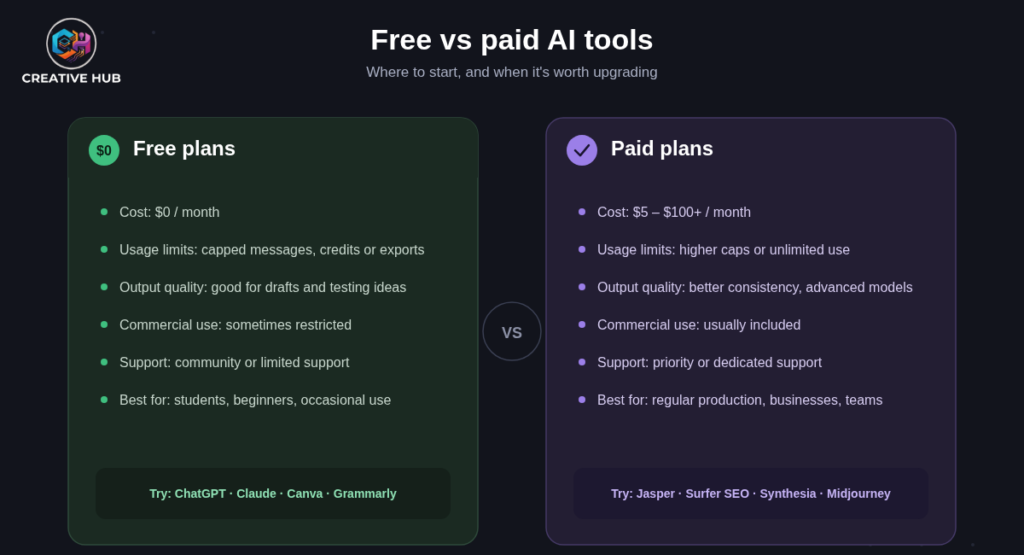
| Factor | Free AI Tools | Paid AI Tools |
| Cost | $0 | $5–$100+/month |
| Usage limits | Often capped (messages, credits, exports) | Higher or unlimited limits |
| Output quality | Good for drafts and experimentation | Better consistency and advanced models |
| Commercial use | Sometimes restricted | Usually included |
| Support | Limited or community-based | Priority or dedicated support |
| Best for | Testing tools, occasional use, students | Regular content production, businesses |
The honest advice here: start free wherever possible. Free plans on tools like ChatGPT, Claude, Canva, and Grammarly are strong enough for most beginners and casual creators. Upgrade to paid plans only once you hit a real limitation — a usage cap, a missing feature, or a quality ceiling — rather than upgrading because a plan looks impressive on paper.
Frequently Asked Questions
What is the best AI tool for beginners?
Canva AI and ChatGPT are the easiest starting points. Canva handles visuals with almost no learning curve, and ChatGPT’s free plan covers most everyday writing and brainstorming needs.
Which AI tool is free?
ChatGPT, Claude, Gemini, Canva, Grammarly, Leonardo AI, Runway, Descript, ElevenLabs, Perplexity, Gamma, CapCut, and VEED all offer usable free plans, though most cap usage or features.
Is ChatGPT enough for content creation?
For writing alone, yes, ChatGPT covers a large share of what most creators need. For images, video, and voice, you’ll still want a specialized tool alongside it.
Can AI create videos?
Yes. Tools like Runway generate original video clips from text, while Pictory, Descript, CapCut, and VEED edit and repurpose existing footage using AI.
Which AI tool is best for YouTube?
Descript for editing, ElevenLabs for voiceovers, and CapCut for short-form clips form a strong combination for most YouTube creators.
What AI tool is best for bloggers?
Claude or ChatGPT for drafting, paired with Frase or Surfer SEO for research and optimization, covers the full blogging workflow.
Are AI-generated images copyright-free?
It depends on the tool and your local laws. Adobe Firefly is trained on licensed content and built for commercial use, which makes it a safer legal choice than some competitors. Always check a tool’s specific licensing terms before commercial use.
Can AI replace human writers?
Not entirely. AI is excellent at speeding up drafts, research, and repetitive writing tasks, but it still struggles with genuine originality, brand nuance, and factual accuracy without human oversight and editing.
Is Midjourney better than Adobe Firefly?
Midjourney generally produces more artistic, visually striking results, while Firefly is the safer choice for commercial projects due to its licensing model. The “better” tool depends on your priority: art quality or legal safety.
What’s the best free AI writing tool?
ChatGPT’s free plan is the most capable free writing tool currently available, followed closely by Claude’s free tier.
Do I need Grammarly if I already use ChatGPT?
Yes, they serve different purposes. ChatGPT generates content; Grammarly polishes it, catching typos, tone issues, and clarity problems that AI-generated drafts often still contain.
What’s the best AI tool for social media content?
Canva AI for graphics, CapCut for short-form video, and ChatGPT or Copy.ai for captions cover most social media needs.
Which AI tool is best for SEO?
Surfer SEO is the strongest for data-driven on-page optimization, while Frase is a more affordable option for building content briefs.
Can small businesses afford AI content tools?
Yes. Most small businesses can run an effective content stack using free or low-cost tools like ChatGPT, Canva, and Grammarly before investing in premium platforms like Jasper or Surfer SEO.
Is AI-generated content bad for SEO?
Not inherently. Search engines evaluate content quality and helpfulness rather than whether AI was involved in creating it. Low-quality, unedited AI content performs poorly, but well-edited, genuinely useful AI-assisted content can rank just fine.
What AI tool is best for voiceovers?
ElevenLabs is widely regarded as the most natural-sounding AI voice generator currently available, with strong multilingual support.
Can AI tools help with video translation?
Yes. HeyGen and ElevenLabs both offer AI dubbing and translation features, including lip-sync matching for HeyGen specifically.
How much should I budget for AI content tools monthly?
Most solo creators spend somewhere between $20 and $60 a month once they move past free plans, typically covering one writing tool, one design or video tool, and occasionally an SEO tool.
Are there AI tools specifically for presentations?
Gamma is purpose-built for this, generating full slide decks from a prompt or outline in minutes.
Do AI tools work well together?
Yes, and combining them is usually more effective than relying on one all-in-one platform. A common stack looks like: Claude or ChatGPT for drafting, Surfer SEO or Frase for optimization, Canva for graphics, and Descript or CapCut for video.
Conclusion
There’s no single “best” AI tool for content creation, despite what most headlines promise. The right choice depends entirely on what you’re making, how often you make it, and what you’re willing to spend. A solo blogger, a YouTube creator, and a marketing agency will each land on a completely different stack — and that’s fine.
If you’re just getting started, don’t overthink it. Pick one free writing tool (ChatGPT or Claude), one free design tool (Canva), and build from there as you hit real limitations rather than perceived ones. Add specialized tools for video, voice, or SEO only once your content actuallyEEO demands them.
For a deeper look at building out a full content workflow, or getting a second opinion on which tools fit your specific niche and budget, it’s worth working through a proper content strategy audit before subscribing to anything new.